
Choosing an app
Are Photo Cleaner Apps Safe? What to Check Before Installing
On an iPhone, photo cleaner apps are safe in three ways: iOS keeps an app out of other apps' data and the system, asks before it deletes photos, and keeps deleted photos in Recently Deleted for 30 days. Privacy and price depend on the app: full access lets it read every photo, and uploads, tracking and weekly fees differ.
This page is written by the makers of GetSorted, a photo cleaner app; the last section holds it to the same checklist. Facts about other apps come from their US App Store pages and, where marked, a developer's own page, read on 14 and 15 November 2026; we installed none of them. What iOS does is taken from Apple's pages, among them the iPhone User Guide for iOS 26 and iOS 27, read on 15 November 2026.
Are photo cleaner apps safe on iPhone?#
Three protections come from iOS and hold for every app:
- The rest of the iPhone is out of reach. Every third-party app is sandboxed, which Apple's Platform Security guide says is designed to keep it from reading or changing other apps' data or the device. So no cleaner can clear other apps' caches or "system junk".
- Deleting needs your yes. An app deletes photos through Apple's Photos framework, and iOS then shows its own dialog asking for your permission (Apple's developer documentation).
- Deleted is not gone. Deleted photos stay in Recently Deleted in the Photos app for 30 days.
What iOS leaves to you: whether an app uploads your photos, what it reports, what it charges and which photos it proposes to delete.
What does full access to photos mean on iOS?#
The first time an app wants your photos, iOS asks. According to Apple's Photos & Privacy page, full access gives the app your photos and videos, including hidden ones even if the Hidden album is locked, with metadata such as location. With access to selected photos, the app gets only those. Some cleaners accept nothing less than full access: Swipewipe, per its help page, and GetSorted.
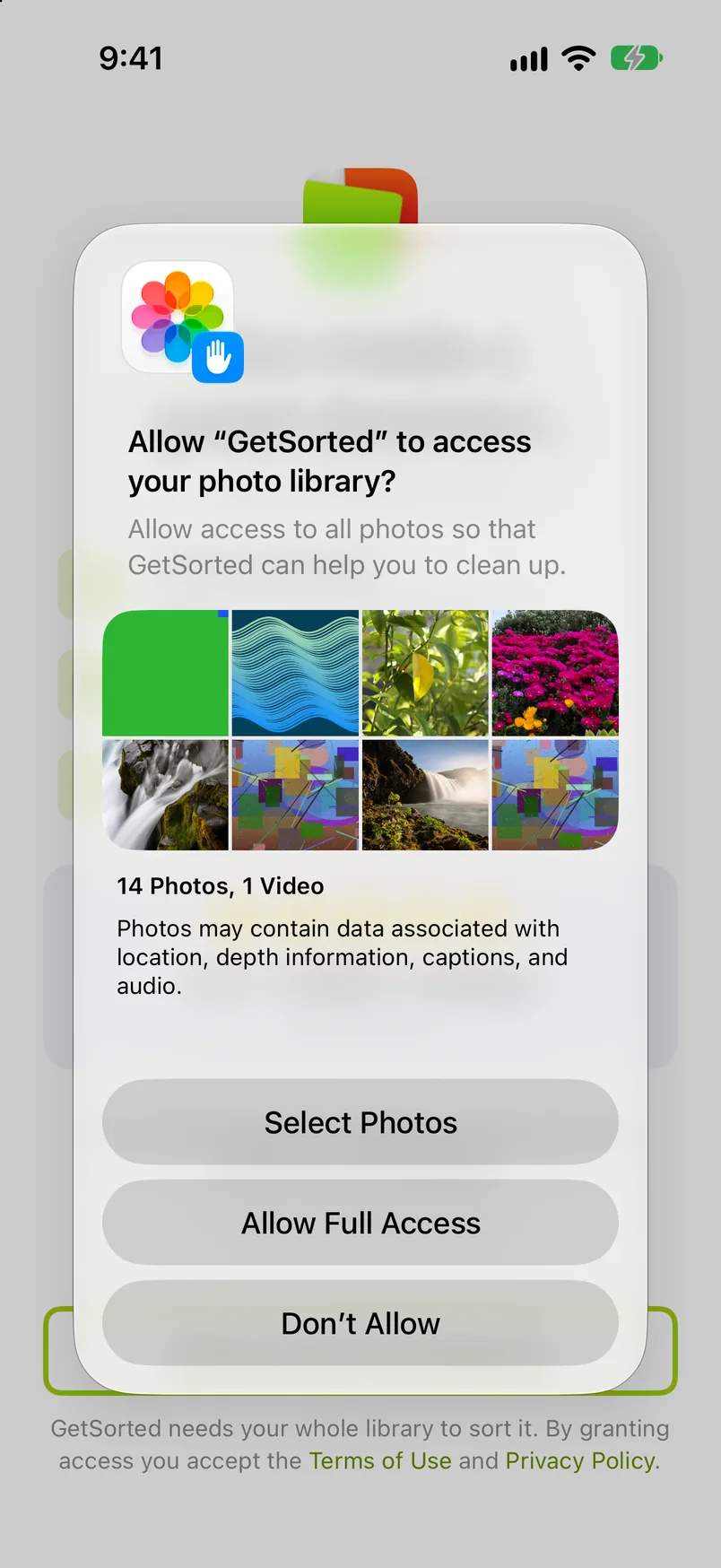
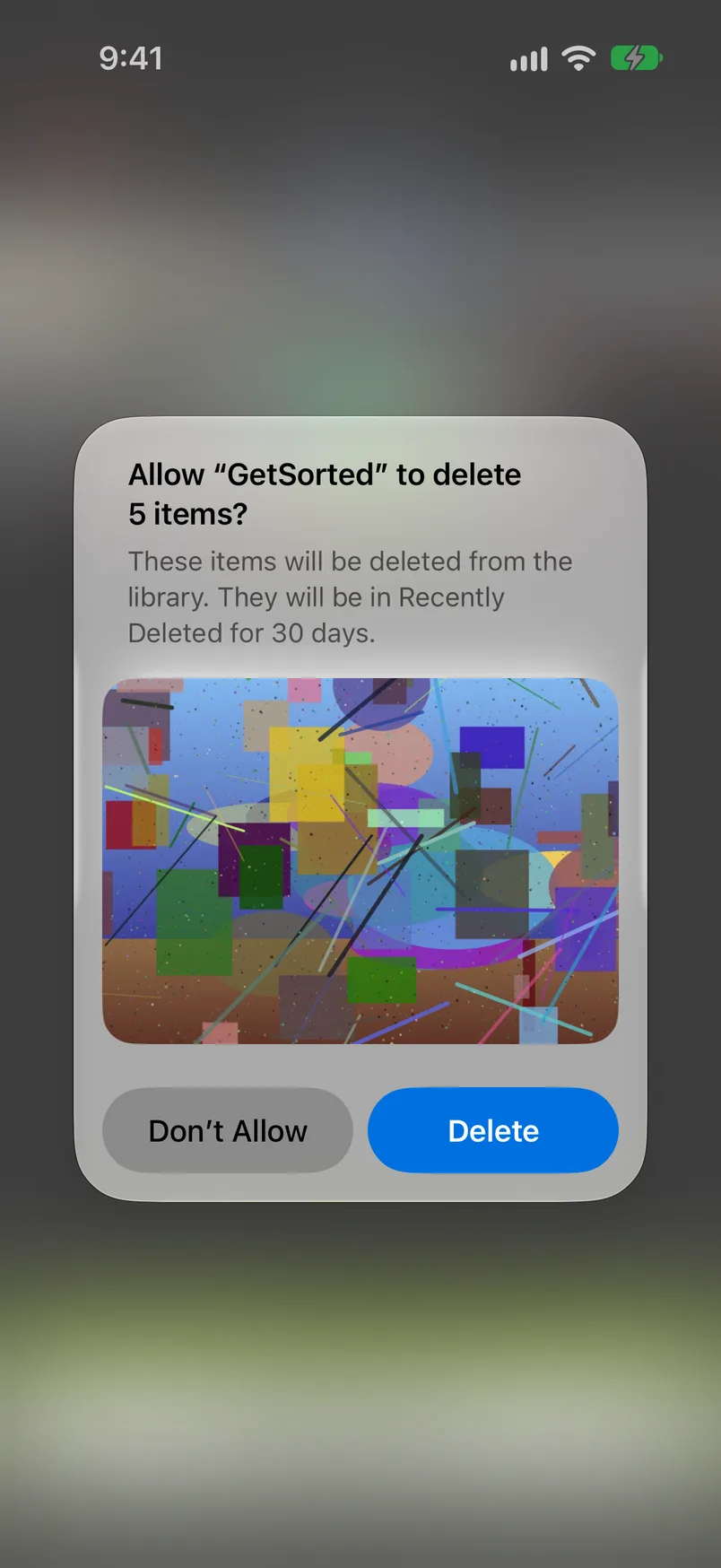
Full access does not let an app delete without asking. To see how often an app reads your photos and which internet domains it contacts, turn on App Privacy Report (Settings, Privacy & Security). It lists domains, not what is sent.
To limit or withdraw access later:
- Open Settings and tap Privacy & Security.
- Tap Photos. The list shows the apps that asked for access.
- Tap an app and choose less access, or none.
What are the real risks? A short checklist before you install#
Check these before you allow access:
- Uploads: where are photos processed? An app that can read your photos can also send them to a server. The description or the privacy policy should say on the device, or not uploaded. "Not stated" is not a no, and not a promise.
- Wrong picks: is anything deleted before you confirm? Automatic cleaners propose what to delete, and iOS asks once for the whole batch. Look for a review step or a trash inside the app.
- Where do deleted photos go, and for how long? To Recently Deleted, for 30 days. One exception, Apple's: if your iCloud storage is over its limit, they are removed at once.
- Tracking: what does the privacy label declare? Under App Privacy, look for "Data Used to Track You" and for photos or videos. Developers supply the label; Apple does not verify it.
- Fees: what does it cost? Under In-App Purchases, "weekly" is a price charged 52 times a year, and "with Trial" becomes a paid plan unless you cancel. Apple's advice: cancel at least 24 hours before a trial ends (Settings, your name, Subscriptions).
- Ads. Under Age Rating, look for "Contains: Advertising".
What do the App Store privacy labels of the best-known apps say?#
Is Swipewipe safe, is Cleanup safe, is Clever Cleaner safe? We give no verdict on any app; these are the developers' own declarations (US App Store, 14 and 15 November 2026).
| App | "Contains: Advertising" | Data Used to Track You | Photos or videos in the label | Description says on device or not uploaded |
|---|---|---|---|---|
| Swipewipe | Shown | Identifiers, usage data, other data | Not named | Not stated |
| Slidebox | Shown | No such section | Named: not linked to you | Not stated |
| Slider | Not shown | Identifiers, usage data | Not named | Yes |
| Picnic | Shown | Identifiers, usage data | Not named | Yes |
| Photo Cleaner ® | Shown | Location, identifiers, usage data, diagnostics | Not named | Not stated |
| Cleanup | Not shown | Purchases, identifiers, usage data | Not named | Yes |
| Clever Cleaner | Not shown | Identifiers | Not named | Yes |
| CleanMy®Phone | Not shown | Identifiers, usage data | Not named | Yes |
| Cleaner Guru | Shown | Purchases, identifiers, usage data | Named: linked to you | Yes |
| Cleaner Kit | Shown | Purchases, location, identifiers, usage data, diagnostics, other data | Not named | Yes |
| GetSorted (ours) | Not shown | No such section | Not named | Not stated |
Prices are in the best photo cleaner apps compared and Is Swipewipe free?
Do iPhones need a cleaner app at all?#
No. The Photos app merges duplicates (Collections, Utilities, Duplicates, Merge), deletes one photo or many, and keeps what you delete for 30 days; Settings, General, iPhone Storage shows what fills the phone. The built-in route is in How to clean up photos on iPhone. What Photos lacks is a review in which you mark now, delete later and see your progress month by month. Swipe apps add that; automatic cleaners add proposals.
How GetSorted handles each point, and what it sends#
- Where photos are processed. GetSorted does not upload your photos or videos; they are shown and compared on your device. It has no server of its own and no account. A photo leaves GetSorted only when you share it, and originals stored only in iCloud are downloaded by iOS when GetSorted shows or compares them (Privacy). With iCloud Photos on, your sorting progress is also saved in your private iCloud, which nobody at GetSorted can read.
- Access. It needs access to all photos; a selection is not enough.
- Deleting. A swipe only marks a photo, and GetSorted never marks one by itself. Nothing is deleted before you tap Complete month or empty the Trash and confirm the iOS dialog. Then the photos are in Recently Deleted for 30 days, with Apple's exception above.
- Ads and price. No ads, and the download is free. Free to use means six calendar months of your library, of your choice, with no time limit (six months of photos, not six months of time); then a monthly or yearly subscription. During setup the app shows its plans: the X at the top right closes that screen, the big Continue button starts a purchase. GetSorted's own App Store description still said "no subscription" on 15 November 2026; that text is out of date.
- Label. One section, Data Linked to You: identifiers, usage data, diagnostics and customer support content (US App Store, 15 November 2026).
A label is a summary. This is what GetSorted sends, from the first launch, with no consent step and no switch:
| Service | What it receives |
|---|---|
| Mixpanel: usage statistics | Which screens and features are used, as events with numbers (for example how many photos a month held and how many you removed); device model, iOS version, your plan and daily goal; an approximate location (the city) worked out from the IP address |
| Sentry: crash and error reports | Crashes, hangs and errors with device details and a trail of the last screens, buttons and network requests. A button's title can contain an album name; one kind of error report lists photo identifiers, dates and decisions. Also a short signal at every start |
| RevenueCat: purchases | Contacted at every launch. The App Store receipt; once, Apple's token that tells whether a Search Ads campaign led to the install; with every request the identifier iOS gives this developer's apps on your device, the device model and your App Store country |
None of it contains your photos, videos, thumbnails or file names; statistics and crash reports go to the two services' US addresses. GetSorted does not ask for permission to track you across other companies' apps and does not read the advertising identifier. The full list, read from the app's code, is under What is reported.
Are photo cleaner apps safe for iPhone?
For the iPhone itself, yes: iOS keeps an app out of other apps and the system. For your photos it depends on the app: check where photos are processed, the privacy label and the price first.
Can a photo cleaner app upload or steal my photos?
With full access an app can read every photo, and iOS does not prevent uploads. Look for a statement that photos are processed on the device.
Can a cleaner app delete photos without asking me?
No. iOS shows its own dialog before an app deletes photos, and deleted photos stay in Recently Deleted for 30 days, unless your iCloud storage is over its limit.
Does Apple have its own photo cleaner?
Not as a separate app. Photos has a Duplicates collection and Recently Deleted; its Clean Up tool is something else and removes objects from one photo (iPhone User Guide for iOS 27).