
Choosing an app
Swipewipe Alternatives for iPhone: Free and Paid Swipe Apps Compared
Which Swipewipe alternative fits depends on why you are leaving. No ads and a monthly or yearly price: GetSorted, where six months of your photo library are free. Swiping with no daily limit: Clever Cleaner's Swipe mode, according to its listing. A one-time purchase: Slidebox or Clever Cleaner. An iPhone that cannot run iOS 18: GetSorted or Slidebox.
We make GetSorted, one of the apps compared here. Every fact about another app comes from its US App Store page or its developer's website, read on 14 and 15 November 2026. We installed none of them, so how each one works is told according to those sources, and "not stated" means they are silent.
What is the best alternative to Swipewipe?#
It depends on your reason for leaving:
- Ads. GetSorted shows no ads, whether you pay or not. Neither does Clever Cleaner, according to its listing.
- The swipe limit. Clever Cleaner's listing says its Swipe mode has no daily limit; Picnic's gives 100 free swipes a day. GetSorted has no daily limit either, but only six calendar months of your library are free: six months of photos, not six months of time.
- The weekly price. GetSorted Plus is a monthly or a yearly plan. Slidebox and Clever Cleaner each list a one-time Lifetime purchase.
- An iPhone without iOS 18, which Swipewipe requires. GetSorted and Slidebox need iOS 15.
- Albums. GetSorted and Slidebox file a photo into an album with one tap while you sort.
- No extra app. The Photos app merges duplicates (Collections, Utilities, Duplicates) and keeps deleted photos in Recently Deleted for 30 days. Apple's iPhone User Guide for iOS 26 and iOS 27 describes no swipe to keep or delete.
Why do people look for a Swipewipe alternative?#
Swipewipe's App Store page carries the line "Contains: Advertising". Its help page says the free version has ads and a swipe limit: at the limit a countdown starts, or you watch a short video. The App Store page lists weekly items from $3.99 to $9.99 and one yearly item at $29.99; 52 weeks come to $207.48 at the lowest weekly item and $519.48 at the highest. (A listing shows at most ten purchase items, and not which one a new user is offered.) The app requires iOS 18.
In US reviews with 1 to 3 stars, "ads" or "ad" appears in 202 of 369 (55%) written from 1 September to 14 November 2026, against 123 of 839 (15%) from 14 November 2025 to 31 August 2026 (AppFigures). The all-time rating was 4.7 stars from 102,101 US ratings (App Store, 14 November 2026).
Prices, free limits and canceling have their own page: Is Swipewipe free?
Swipewipe and its alternatives side by side#
Other apps: US App Store and developer websites, 14 November 2026. GetSorted's prices: US App Store, same date, for new subscribers.
| Swipewipe | GetSorted | Slidebox | Picnic | Clever Cleaner | |
|---|---|---|---|---|---|
| Free use | Ads and a swipe limit (help page) | 6 calendar months of your library; no daily limit | Not stated | 100 swipes a day (listing) | Swipe mode: no daily limit (listing) |
| Ads (App Store age rating) | "Contains: Advertising" | None | "Contains: Advertising"; release notes of 9 November say "No ads" | "Contains: Advertising"; description says ad-free | No such line; listing says no ads |
| Purchases listed | Weekly $3.99 to $9.99; "Premium" $5.99, $9.99; 1 year $29.99 | Monthly $7.99; yearly $34.99 | 1 week $1.99, $2.99; monthly $4.99; 1 year $19.99 to $49.99; Lifetime $29.99, $49.99 | Weekly and pass items $4.99 to $7.99; monthly $9.99; annual $19.99 to $39.99 | Weekly $6.99; Lifetime $39.99 |
| Month by month | Yes | Yes | Yes (release notes) | Not stated | Not stated |
| Albums by tap | Not stated | Yes | Yes | Yes (developer's site) | Not stated |
| Deletes after | Review screen | Complete month or the Trash, then the iOS dialog | In-app trash | Archive | Not stated |
| Daily habit | Streaks, On This Day | Daily goal, streaks, achievements | Not stated | Streak, reminders | Not stated |
| Requires | iOS 18 | iOS 15 | iOS 15 | iOS 17, iPhone only | iOS 16 |
GetSorted's purchase list also shows "Old unlock (not for sale)": an earlier one-time purchase, still honored and restored with Restore purchase. GetSorted's own App Store description still said "no subscription" on 15 November 2026; that text is out of date.
Is there a free app like Swipewipe?#
Swipewipe itself is free with ads and a swipe limit. Clever Cleaner's listing says its Swipe mode has no daily limit and the app has no ads. Picnic's listing gives 100 free swipes a day; App Store reviews from August to October 2026 report 20 to 25 (user reports, not verified; Picnic's US rating is 4.8 stars from 10,537 ratings). GetSorted is free for six months of photos, then needs a subscription. More: free photo cleaner apps.
Swipewipe, Slidebox or Picnic: what is the difference?#
Swipewipe and Picnic have the same seller, MWM, and the same gesture: left removes, right keeps. Picnic's listing names no month list, and the app runs on iPhone only.
Slidebox sorts into albums as you go: swipe up to trash, pull down for a favorite, tap an album to file. Its privacy label has no "Data Used to Track You" section; it names photos or videos as data not linked to you. More: Slidebox alternatives.
Swipewipe vs Cleanup: Cleanup's listing describes a storage cleaner for photos, videos, email and contacts, not a swipe sorter; see the photo cleaner comparison.
How GetSorted differs, and where it does not#
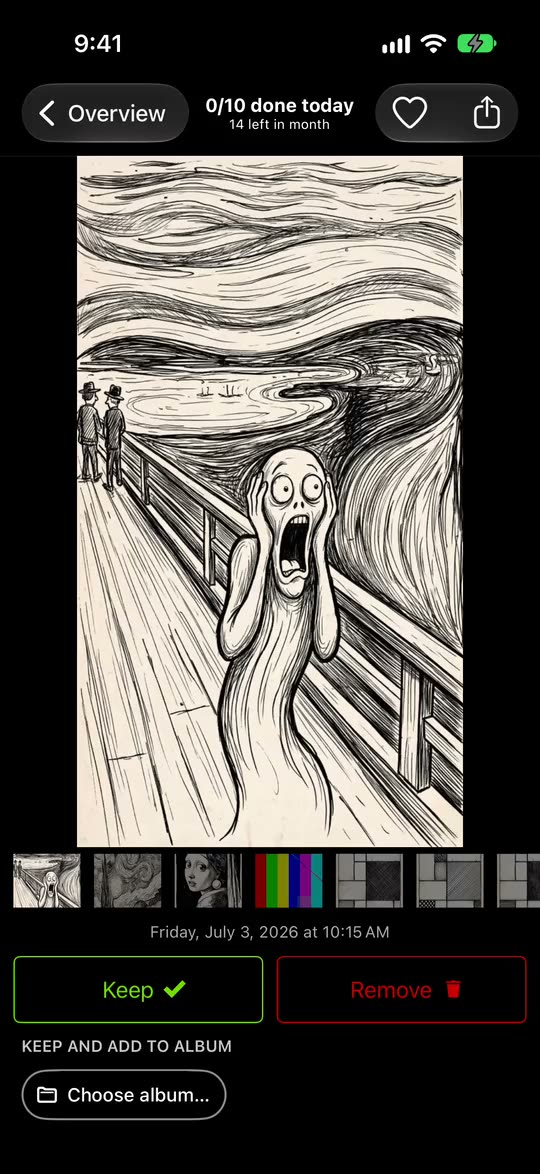
Like Swipewipe, GetSorted cuts your library into months, a swipe only marks a photo, and nothing is deleted before you confirm. The differences:
- Up and down. Swipe up marks a photo Remove, swipe down marks it Keep; left and right only look around.
- No ads, no weekly plan. Free means six calendar months of your library, of your choice, with no time limit. GetSorted Plus unlocks the rest: $7.99 a month or $34.99 a year in the US, £7.99 or £34.99 in the UK (App Store, 14 November 2026, prices for new subscribers). Swipewipe's listed yearly item, $29.99, is lower.
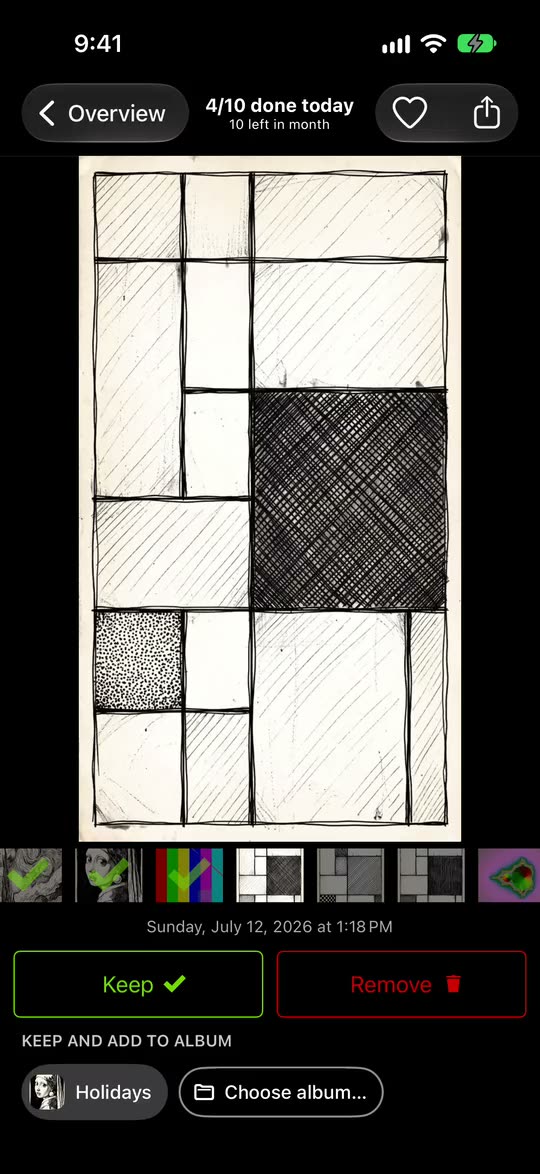
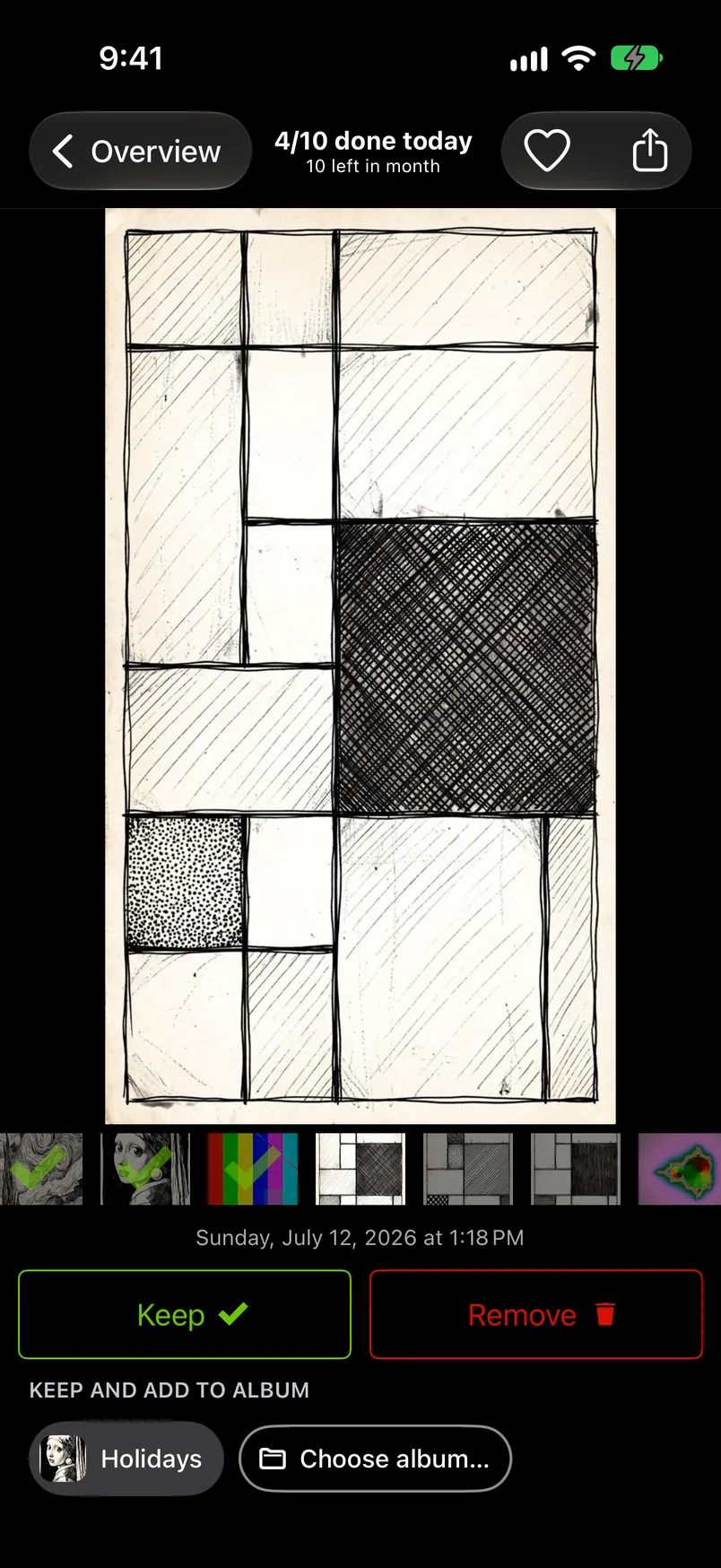
- Albums in one tap. A tap on an album chip keeps the photo and files it. Swipewipe's listing and help page state nothing on this.
- More lists: videos, screenshots and Live Photos by month, and similar photos to compare. GetSorted does not find identical duplicates; Apple's Duplicates album does.
- Open a month on the Overview tab.
- Swipe up to mark a photo Remove or down to mark it Keep, or tap an album chip to keep and file it.
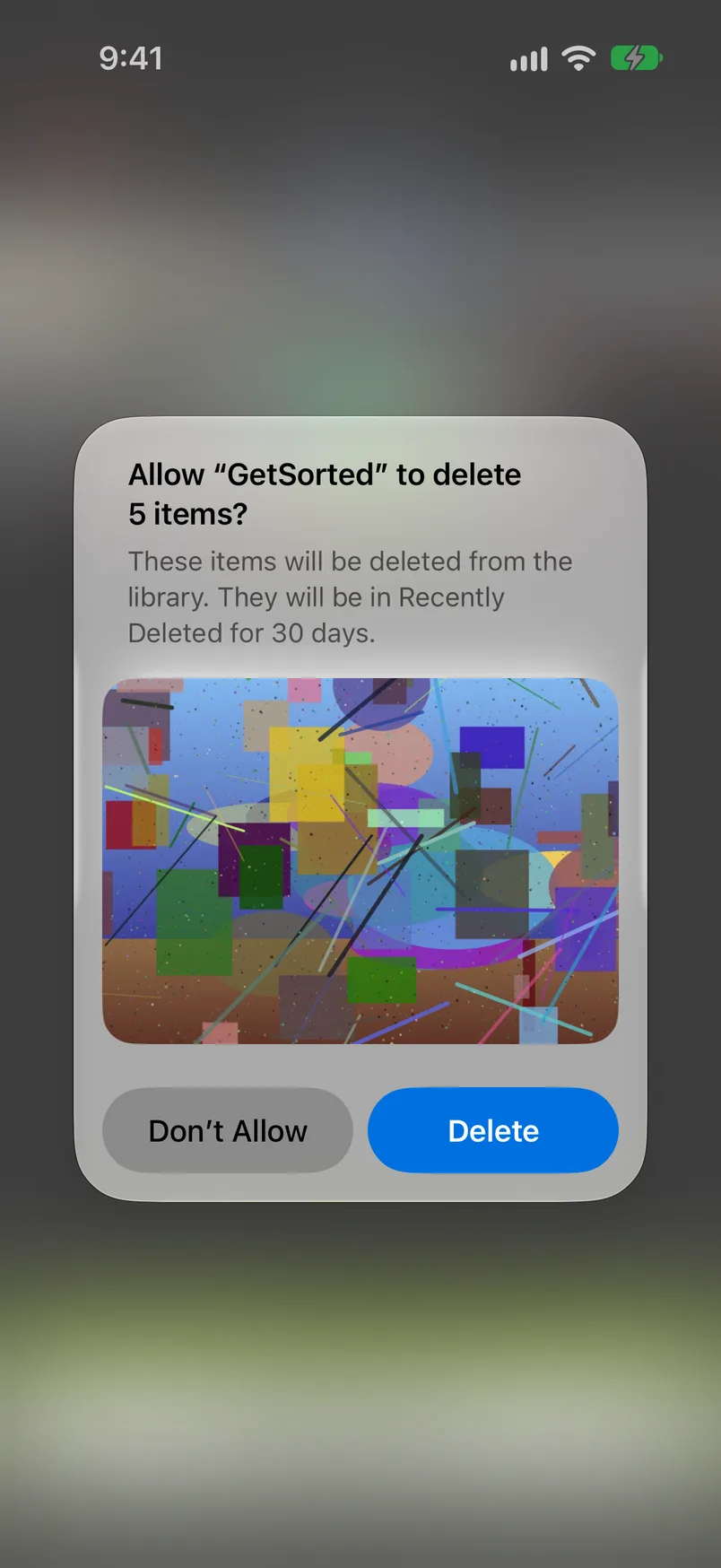
- When every photo has a decision, tap Complete month, or empty the Trash at any time. iOS asks you to confirm, and the photos marked Remove go to Recently Deleted for 30 days.
On privacy: Swipewipe's App Store label lists identifiers, usage data and other data under "Data Used to Track You" (14 November 2026); Apple notes that developers supply these labels and Apple has not verified them. GetSorted does not upload your photos or videos; they are shown and compared on your device. It sends usage statistics, crash reports and purchase status to three services, with no consent step and no switch: see what is reported.
How do you switch? There is nothing to migrate#
Both apps work on the library in Apple's Photos app. What you deleted with Swipewipe is gone from it (or in Recently Deleted for up to 30 days), and your albums and favorites stay. GetSorted cannot see your Swipewipe decisions, so every month starts undecided.
- If you subscribed to Swipewipe, cancel first: Settings, your name, Subscriptions, Swipewipe, Cancel Subscription. Deleting an app does not cancel its subscription, Apple says.
- Install GetSorted and allow access to all photos.
- Start with months you have not cleaned yet: a month counts as one of your six free months from the first decision in it.
When should you stay with Swipewipe?#
Stay if you use what the alternatives do not list:
- Android. Swipewipe has an Android version; GetSorted runs on iPhone and iPad only.
- On This Day and its widget, the Random and Duplicates lists, bookmarks for undecided photos, a highlight video of a month.
- The paid extras: an AI photo enhancer, a world map and compression. GetSorted has none of them.
- Twelve languages. GetSorted speaks English and German.
- The price. The free version costs nothing, with ads and a limit; the listed yearly item is below GetSorted's.
Is there a free alternative to Swipewipe?
Swipewipe itself is free with ads and a swipe limit. Clever Cleaner's listing says its Swipe mode has no daily limit (App Store, 14 November 2026). GetSorted is free for six calendar months of your library, with no time limit, then needs a subscription.
Is there a Swipewipe alternative without ads?
GetSorted shows no ads, whether you pay or not. Clever Cleaner's listing says the app has no ads, and its App Store page has no "Contains: Advertising" line. The pages of Swipewipe, Slidebox and Picnic carry it (US App Store, 14 November 2026).
Is there a Swipewipe alternative for iPhones that cannot run iOS 18?
Yes. Swipewipe requires iOS 18. GetSorted and Slidebox need iOS 15, Clever Cleaner iOS 16 and Picnic iOS 17 (App Store, 14 November 2026).
Swipewipe or Slidebox: what is the difference?
In Swipewipe you swipe left and right through a list of months. In Slidebox you swipe up to trash and file photos into albums with a tap; its description names no month list (its release notes of 22 December 2025 say a monthly organization is back), and it lists a one-time Lifetime purchase.