
What the Trash holds#
The Trash holds every photo and video you marked Remove and have not deleted yet: from every month, from the Videos, Screenshots and Live Photos lists and from groups of similar photos. A photo is in it once, whichever list you marked it in. What you marked on another of your devices is in it too, once that device's progress has reached this one through your iCloud.
These photos are still in your library. Remove is a mark in GetSorted and changes nothing in the Photos app. The Trash is GetSorted's own list; it is not the Recently Deleted album in Photos, where photos go after you delete them.
| The Trash in GetSorted | Recently Deleted in Photos | |
|---|---|---|
| What is in it | Photos and videos you marked Remove | Photos and videos that were deleted |
| Where the photo is | In your library, exactly as before | Out of your library; iOS keeps it for 30 days, then deletes it for good |
| Getting it back | Tap it in the Trash and it is kept | Recover it in the Photos app within the 30 days |
| Storage | Takes its space as before | Still takes its space until it leaves the album |
GetSorted never empties the Trash by itself. There is no time limit and no automatic deletion: a photo stays until you keep it or delete it, here or with Complete month in its month.
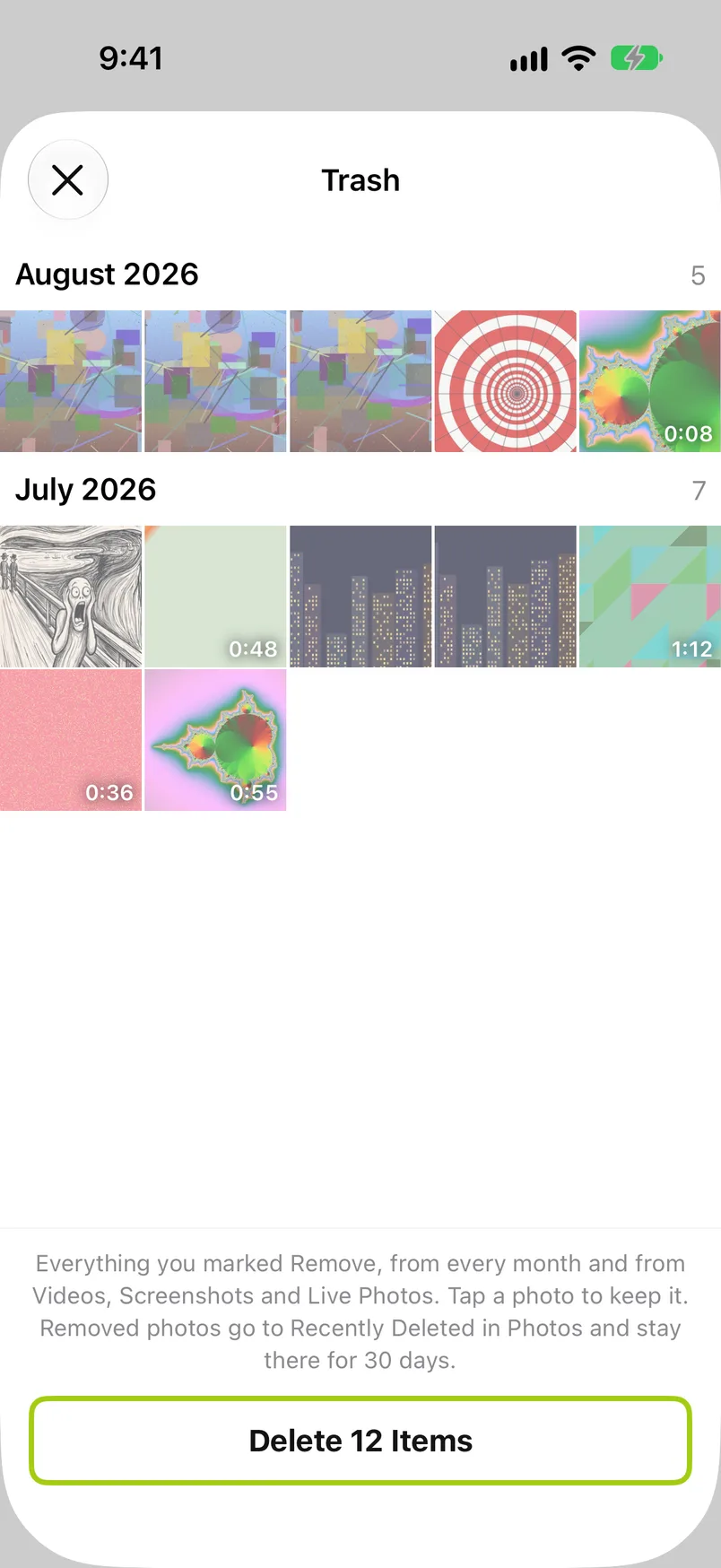
The photos are ordered by the month they were taken, newest month first, each month under a heading with its name and the number of items; inside a month the oldest photo comes first, as in the month's grid. Photos without a date come last under No date. Thumbnails are dimmed, videos show their length, and an item that is not on this device shows a crossed-out cloud instead of a picture.
Under the photos, above the button, a note repeats the rule: Everything you marked Remove, from every month and from Videos, Screenshots and Live Photos. Tap a photo to keep it. Removed photos go to Recently Deleted in Photos and stay there for 30 days.
An empty Trash reads "Nothing to delete. Photos you mark Remove wait here until you delete them."
Opening the Trash#
There are two ways in:
- The trash button at the top left of any month grid, also the grid of a Videos, Screenshots or Live Photos month and of a group of similar photos; see The trash button.
- The items to delete card at the top of the Clean up tab ("12 items to delete"), which also shows roughly how much space the waiting items take on this device; see Items to delete.
The button is active whenever anything is marked Remove anywhere in your library (except while Quick Select is on), and on iOS 26 or later it shows the number. The number counts the whole Trash, not the month on screen. With nothing marked Remove, the button is grayed out and the card is not there.
The Trash opens as a sheet; the close button is at the top left. The Trash works the same with and without a subscription.
Keeping a photo after all#
To undo a removed photo, tap it: it is marked Keep and leaves the Trash. It stays decided, so no month gets an undecided photo back, and it does not count toward the daily goal (a changed decision never does). The tap works at once, without a question. If it was a slip, mark the photo Remove again in its month.
Touch and hold a photo that is on this device for a larger look and the action Keep. The menu shows a heart next to it; here it only keeps the photo and does not make it a favorite.
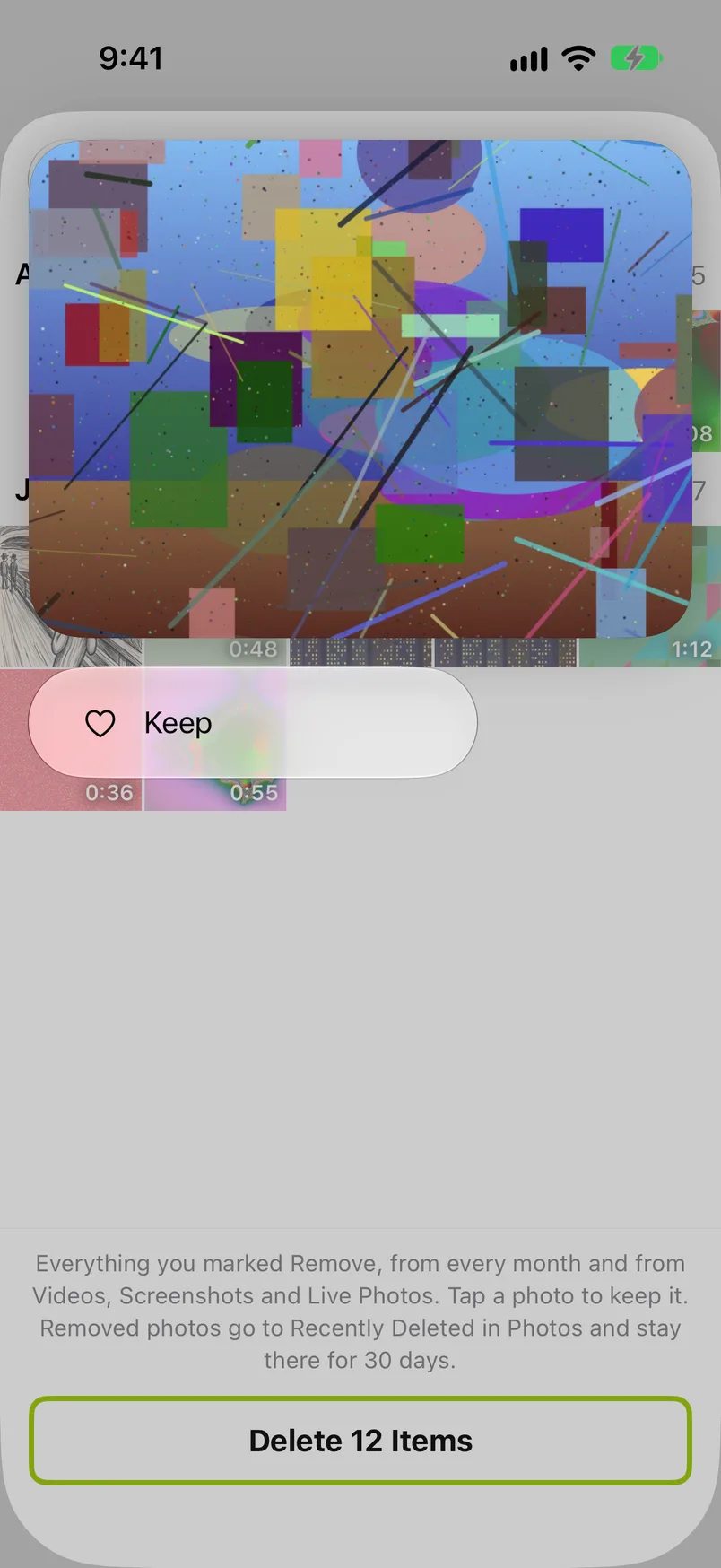
When you take the last photo back, the sheet stays open and shows the empty message. You can also change a decision where you made it: go back to the photo in its month and choose Keep there, see Keep and Remove.
With VoiceOver, each photo is read with its date and the hint "Keeps it and takes it out of the trash."
Emptying the Trash#
To empty the Trash, tap the button at the bottom. It reads, for example, Delete 12 Items, and it deletes everything in the Trash in one go; there is no way to delete only part of it. Whatever should stay has to be tapped first.
iOS asks once to confirm, as it does for Complete month. Confirm, and the photos are deleted from your library: they go to the Recently Deleted album in Photos, where iOS keeps them for 30 days. One exception comes from Apple: if your iCloud storage is over its limit, deleted photos are removed at once and are not kept in Recently Deleted. Recently Deleted says how to get a photo back. If you decline, or the deletion fails, everything stays in the Trash.
GetSorted itself cannot permanently delete photos, and it cannot bring a deleted photo back; both happen in the Photos app. While the photos are in Recently Deleted they still take their space. Storage is freed only when they leave that album: after the 30 days, or sooner if you empty Recently Deleted in Photos yourself. See also the FAQ.
If some items are not on this device (for example because you marked them on another device), GetSorted asks first: "Would you like to discard unavailable to-be-removed items?" Discard unavailable items drops GetSorted's records of them; Keep showing unavailable items leaves them in the Trash. The items that are on this device are deleted either way, after the iOS confirmation. More on such items is in the FAQ.
While the deletion runs the sheet cannot be closed; when the Trash is empty afterwards it closes by itself.
The Trash and your months#
- Complete month or the Trash? Complete month deletes one month's removals, once that month is fully decided. The Trash deletes all removals at once, whenever you like. To delete one month's removals only, complete that month.
- A month with undecided photos stays in progress after you delete from the Trash. Only the photos you had marked Remove are gone.
- A month that was only waiting for Complete month counts as completed once its removals are deleted in the Trash or taken back there, and leaves the Clean up tab like any completed month. No summary card follows in that case: the card comes after Complete month or, in a month where nothing is marked Remove, after the last decision. The month's achievements were counted when its last photo got its decision, so the Trash neither skips nor repeats them.
- A photo you delete in the Photos app itself disappears from the Trash too, as soon as GetSorted learns that it is gone.