
Free up storage
Photos Taking Up Space on iPhone Even With iCloud? Here Is Why
Photos are taking up space on your iPhone even with iCloud because iCloud Photos is a sync, not an archive: the same library sits on the iPhone and in iCloud. Optimize iPhone Storage keeps smaller versions on the phone, but a big library stays big. What shrinks it for good is fewer photos and videos.
You pay for iCloud and the iPhone still says its storage is full. The steps on this page were checked on 15 November 2026 against Apple's support articles and its iPhone User Guide for iOS 26 and iOS 27. It is written by the makers of GetSorted, a photo cleanup app.
Why are photos taking up space on iPhone even with iCloud?#
Because iCloud Photos does not move your photos off the iPhone. It keeps one library in two places, on the iPhone and in iCloud, and keeps them in step: a new photo uploads, an edit shows on every device, a deleted photo is gone everywhere. Apple says so itself in Set up and use iCloud Photos: what you keep in iCloud Photos uses both your iCloud storage and the storage of your device.
Does iCloud free up space on your iPhone?#
Not by itself. A bigger iCloud plan gives the originals more room in iCloud; the iPhone's storage stays the size you bought. Apple's pages describe no button that moves photos from the iPhone to iCloud to free up space. What comes closest is Optimize iPhone Storage, which makes the swap for you.
What does Optimize iPhone Storage do, and is it on?#
It stores the full-resolution originals in iCloud and keeps storage-saving versions on the iPhone. According to Apple, the library is optimized when the device needs more storage, starting with the photos and videos you open least, and originals can be downloaded again over Wi-Fi or cellular.
Does Optimize iPhone Storage delete photos? No: every photo and video stays in your library, and only the version on the phone changes.
Apple says the setting is on by default with iCloud Photos. To check:
- Open Settings, tap your name, then iCloud.
- Tap Photos and make sure Sync this iPhone is on. That switch is iCloud Photos.
- On iOS 27, tap iPhone Storage. On iOS 26, the choice is on the same screen.
- Choose Optimize iPhone Storage. The other choice, Download and Keep Originals, keeps every original on the phone.
One Apple article shortens the name to Optimize Storage; Apple's UK pages spell it Optimise iPhone Storage.
Why is Photos still large with Optimize Storage on?#
Settings, General, iPhone Storage lists what uses the phone. If Photos is large there although the setting is on, the likely reasons are:
- The phone still has room. Apple describes optimizing as something that happens when the device needs more storage, so Photos can look large until then. Apple names no button that starts it by hand.
- Smaller versions still take room. Apple gives no figure. A reply in Apple's Support Community (August 2023) gave at least 10 to 20 percent of the original size as a rule of thumb. That is one user's estimate, but the bigger the library, the more room its small versions need.
- iCloud is full, or the upload is not finished. A photo that has not reached iCloud stays on the phone at full size, and Apple says new photos and videos stop uploading when iCloud storage runs out. In Photos, tap Collections and look at your account icon at the top right: a red exclamation mark means iCloud storage is full.
- Deleted photos are still there. They wait in Recently Deleted for 30 days and take space until then: see why storage is still full after deleting photos.
- It is not only Photos. The same list shows apps, messages with attachments and downloaded videos, which iCloud Photos does not touch.
Can you delete photos from your iPhone once they are in iCloud?#
Not from the iPhone alone while iCloud Photos is on. Apple states that a photo or video you delete on one device is deleted everywhere you use iCloud Photos: after 30 days in Recently Deleted it is gone from the iPhone, from iCloud and from your other devices. No app changes that, GetSorted included, because apps delete through the same photo library.
Two things come close:
- Optimize iPhone Storage keeps everything in iCloud and small versions on the phone.
- Turning off iCloud Photos on this iPhone. Apple describes it in How to turn off iCloud Photos: once everything has uploaded, switch off Sync this iPhone and choose Remove from iPhone. The photos leave the phone and stay in iCloud; from then on, new photos, edits and deletions no longer sync between this iPhone and your other devices. Do not confuse it with Turn Off and Delete Photos in the iCloud storage settings, which deletes the library from iCloud after 30 days.
What actually shrinks the library, on the phone and in iCloud?#
Fewer photos and videos. Each one you delete leaves the iPhone and iCloud together, so one cleanup eases both. Apple's own list is short: move photos you do not want in iCloud to a computer, look at Recommended for You in the iCloud settings and merge duplicates (Manage your photo and video storage).
What remains is deciding what is not worth keeping anywhere. That is the part GetSorted, our app, is made for:
- Open the Overview tab. It lists your library by year and month and, above the years, your videos by month. Videos are usually the biggest files, so start there.
- Open a month and tap Start sorting. One photo or video fills the screen: swipe up to mark it Remove, down to mark it Keep. A swipe deletes nothing: marked photos wait in GetSorted's Trash.
- When the month is decided, tap Complete month and confirm the iOS dialog. Only now are the photos marked Remove deleted: they go to Recently Deleted for 30 days, on every device if iCloud Photos is on.
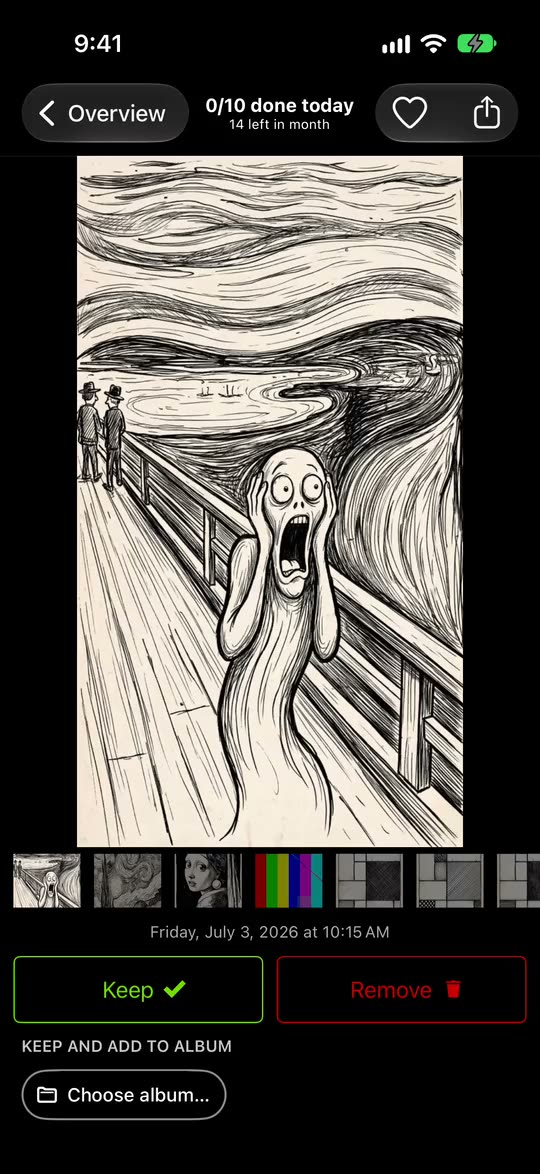
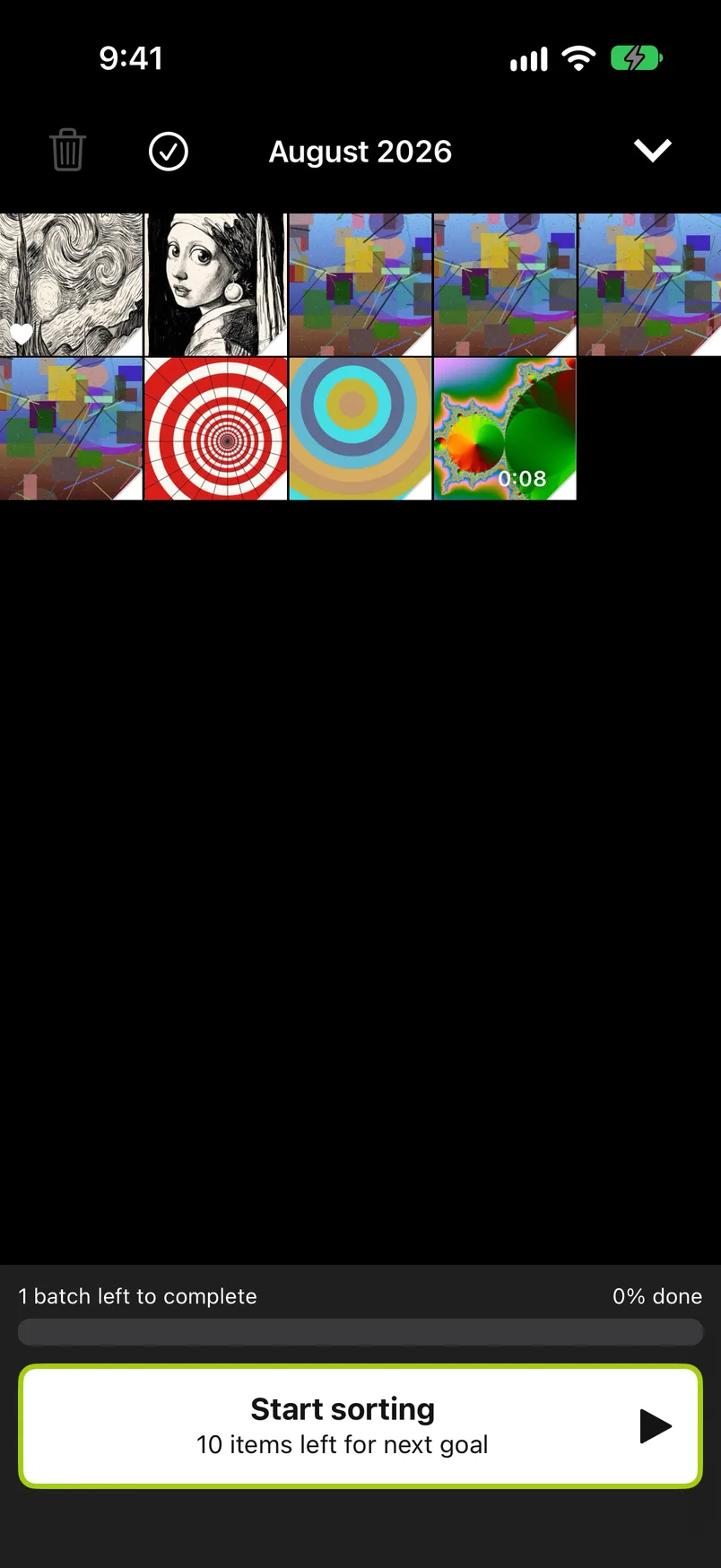
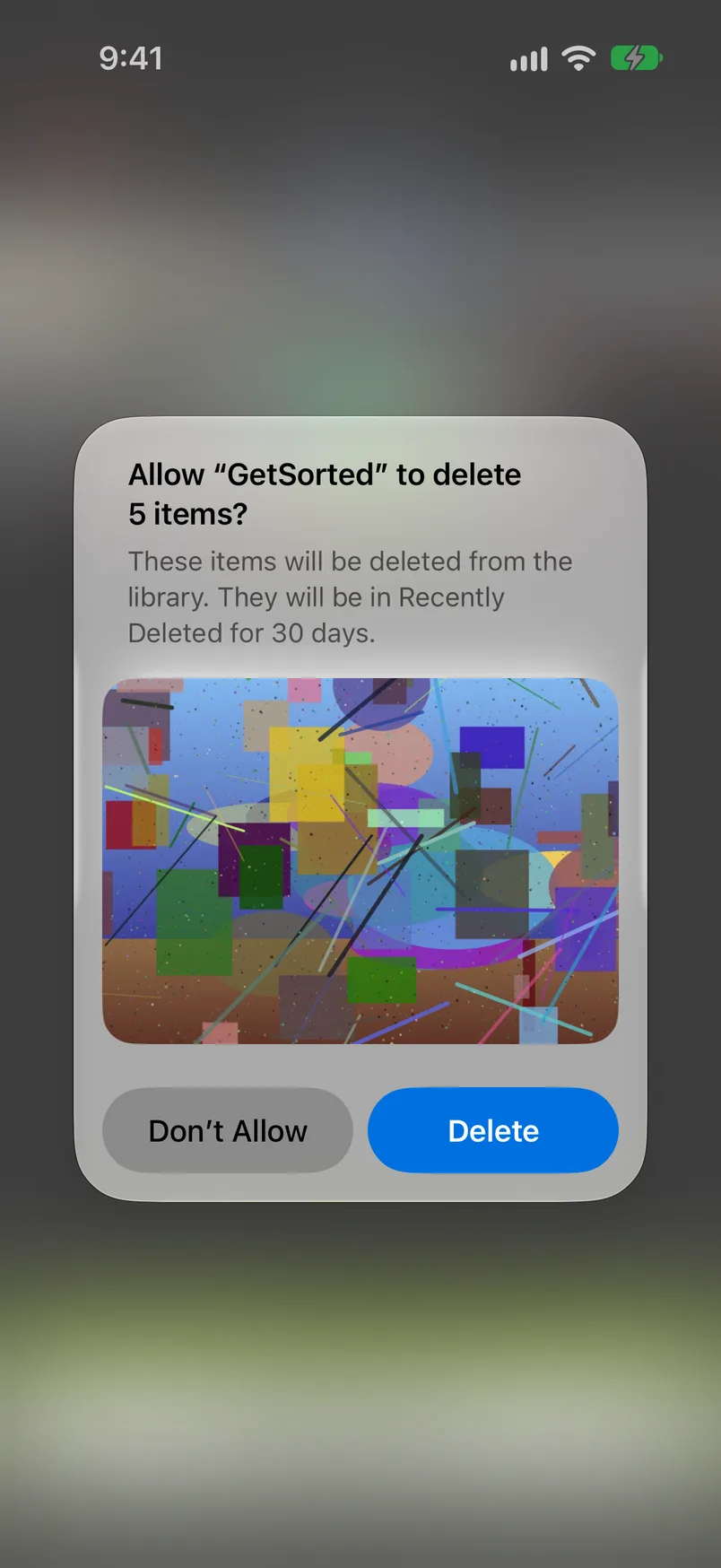
GetSorted cannot move photos to iCloud or take a photo off the phone and keep it in iCloud. It does not compress or sort by file size, and it does not free storage by itself: the space comes back when the deleted items leave Recently Deleted, after 30 days or when you empty it in Photos. It does not upload your photos or videos (it does send usage statistics, crash reports and purchase status to three services, see Privacy); in your iCloud it saves your progress, not photos. With Optimize iPhone Storage on, iOS loads a photo from iCloud when GetSorted shows it, so a good connection helps.
GetSorted is free to download and shows no ads. Free means six calendar months of your library, of your choice, with no time limit: six months of photos, not six months of time. A month counts from the first decision in it. After that GetSorted Plus, a subscription (monthly or yearly), unlocks every month (details).
More: how to clean up photos on iPhone and deleting photos by month.
When is buying more iCloud storage the sensible choice?#
When iCloud is the part that is full (Settings, your name, iCloud shows how much is left). Every account starts with 5 GB, and Apple's iPhone User Guide lists iCloud+ plans from 50 GB to 12 TB. While iCloud is full, new photos stay on the phone at full size, so either the library shrinks or the plan grows. If you want to keep everything, a bigger plan is the honest answer.
It changes nothing when the iPhone storage is full but iCloud has space: more iCloud storage adds none to the phone.
One warning from Apple: if your iCloud storage is over its limit, photos you delete are removed at once and cannot be recovered from Recently Deleted.
Why are photos taking up space on my iPhone when I have iCloud?
Because iCloud Photos syncs your library and does not move it: the photos are on the iPhone and in iCloud at once. Optimize iPhone Storage keeps smaller versions on the phone, and those still need room.
Does iCloud free up space on iPhone?
Not by itself. Optimize iPhone Storage is the part that saves space on the phone: originals in iCloud, smaller versions on the iPhone. A bigger iCloud plan adds no storage to the phone.
What does Optimize iPhone Storage do?
It stores your full-resolution originals in iCloud and keeps storage-saving versions on the iPhone. You find it in Settings under your name, iCloud, Photos (on iOS 27, then iPhone Storage).
Does Optimize iPhone Storage delete photos?
No. Every photo and video stays in your library, and its original stays in iCloud. Only the version on the phone gets smaller.
If I delete photos from my iPhone, will they be deleted from iCloud?
Yes, while iCloud Photos is on: Apple says a photo deleted on one device is deleted everywhere you use iCloud Photos. You have 30 days to recover it from Recently Deleted, unless your iCloud storage is over its limit.